> For the complete documentation index, see [llms.txt](https://docs.getdot.ai/llms.txt). Markdown versions of documentation pages are available by appending `.md` to page URLs; this page is available as [Markdown](https://docs.getdot.ai/integrations/bi-tools/tableau.md).
# Tableau
Dot supports Tableau Cloud and Tableau Server 2019.3 or later. Connect Tableau in two stages:
| Connection | Required | Used for |
| ----------------- | -------- | ------------------------------------------------------------------------------------- |
| **Standard** | Yes | Syncing workbooks, views and data sources; adding metadata and lineage when available |
| **Connected App** | Optional | Reading the exact values shown in dashboard tiles |
## Standard connection
The Standard connection uses a Personal Access Token (PAT). Set this up first for both Tableau Cloud and Tableau Server.
### 1. Create a Personal Access Token in Tableau
Use a Tableau user with the **Site Admin Explorer** or **Site Admin Creator** role.
1. Open **My Account Settings**.

2. Find **Personal Access Tokens**.

3. Enter a name and select **Create new token**.

4. Copy the token name and secret and store the secret securely.
### 2. Connect in Dot
Open the Tableau connection in Dot and stay on the **Standard** tab. Enter:
* **Server URL**
* **Site ID**, if you do not use the default site
* **Token Name**
* **Token Value**
Select **Connect** and wait for the first sync to finish. You can then curate the synced Tableau content under **Model → External assets**.
## Connected App
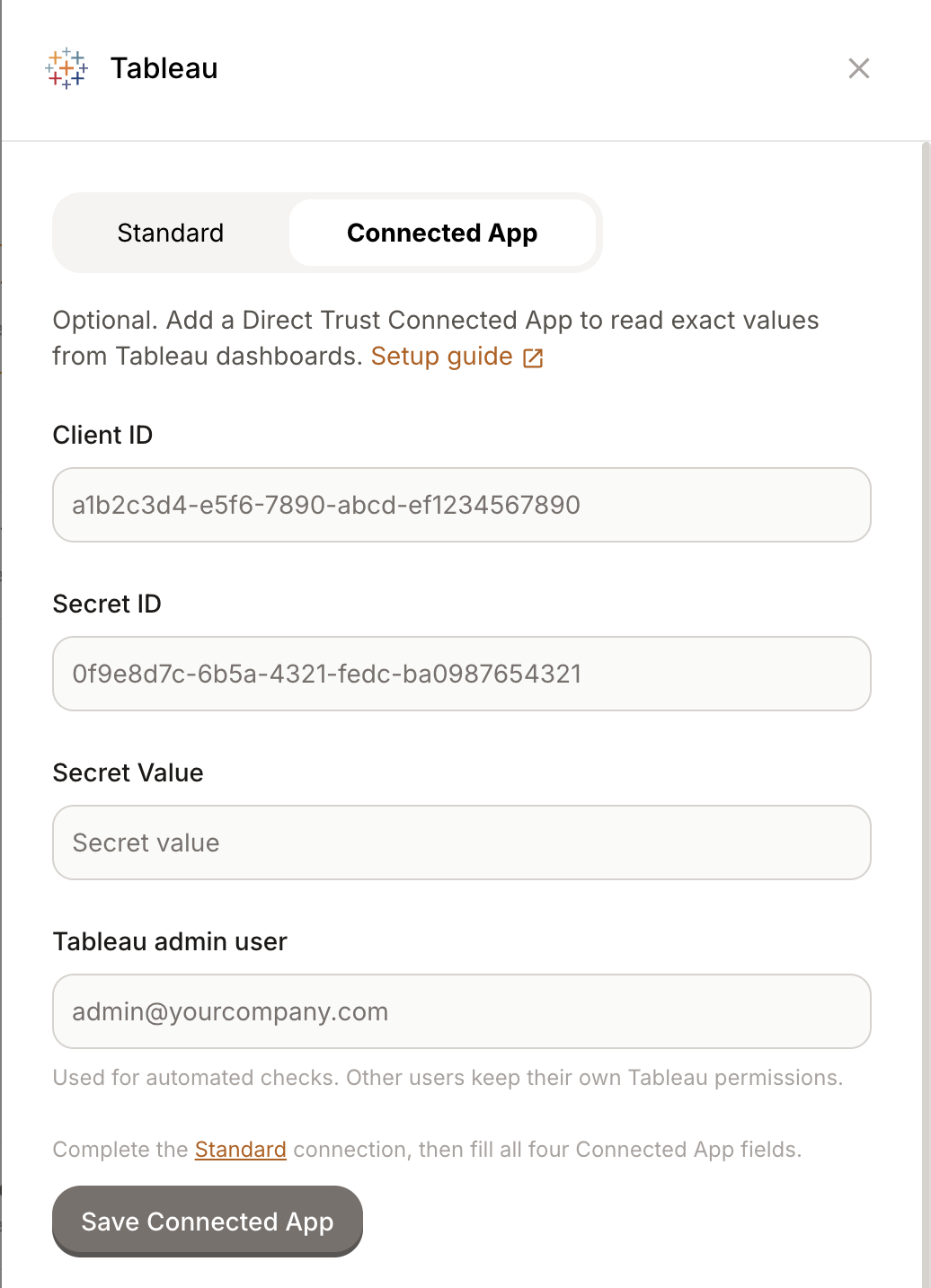
Add a Connected App after the Standard connection if you want Dot to read the exact values shown in Tableau dashboard tiles, including the active filters and period.
### 1. Create a Direct Trust Connected App in Tableau
1. Go to **Settings → Connected Apps** and create an app of type **Direct Trust**, not OAuth 2.0. On Tableau Server, the UI is available in version 2022.1 or later; version 2021.4 supports connected apps through the REST API only.
2. Add the Dot host where your workspace runs to the app's domain allowlist.
3. Enable the Connected App. Tableau creates new apps in a disabled state.
4. Generate a secret and copy the **Client ID**, **Secret ID** and **Secret Value**.
See Tableau's guide to [configuring a Direct Trust Connected App](https://help.tableau.com/current/server/en-gb/connected_apps_direct.htm).
### 2. Connect it in Dot
Open the existing Tableau connection and select the **Connected App** tab. Enter:
* **Client ID**
* **Secret ID**
* **Secret Value**
* **Tableau admin user**
Use an existing licensed Tableau administrator who can access the workbooks Dot should check. Dot uses this account for automated checks. Other users keep their own Tableau permissions.
Select **Save Connected App**. Dot checks the configuration and shows when it was verified or why it failed. Use **Run check again** to retest it later without re-entering the credentials.
## Tableau Server setup
Tableau Cloud manages the services and network access described below. If you use Tableau Server, review the requirements for each connection.
### Standard connection
#### Network access
Dot must be able to reach the Tableau Server URL. Allow Dot's service IPs, `5.78.211.110` and `178.105.217.177`, to access `/api/*`.
If the server is not reachable from the internet, coordinate with our customer success team at . A typical private-network setup uses OpenVPN.
#### Metadata API for full lineage
The Standard connection works without the Metadata API: Dot can still list workbooks and views. Enable the Metadata API if you want Dot to also sync lineage to warehouse tables and calculated-field definitions.
The Metadata API is installed and disabled by default on Tableau Server. The **Tableau Catalog** checkbox in the site UI is separate and does not confirm that the server-level Metadata API is running.
Ask a Tableau Server administrator to verify the service from the initial server node:
```bash
tsm maintenance metadata-services get-status
```
If Dot receives `403 Forbidden` from `/relationship-service-war/graphql`, the server is reachable but the Metadata API is not enabled.
If the Metadata API is not running or its store is not initialized, enable it with:
```bash
tsm maintenance metadata-services enable
```
Enabling it starts metadata indexing and temporarily restarts some Tableau services. See [Tableau's Metadata API guide](https://www.tableau.com/developer/learning/metadata-api#tab-325797-0).
### Connected App
Dot reads exact values through Tableau's Embedding API in a server-side browser. Allow the same Dot service IPs to reach these additional paths:
* `/auth/*`
* `/javascripts/*`
* `/views/*`
* `/vizql/*`
* `/vizportal/*`
If an identity-aware proxy or corporate SSO gateway sits in front of Tableau, it may redirect those browser requests to an interactive login page before they reach Tableau. In that case, the Standard connection can sync successfully while the Connected App check fails.
Ask whoever manages the proxy to exempt Dot's service IPs for the paths above. When Dot detects a redirect, the connection check names the identity provider that intercepted it.