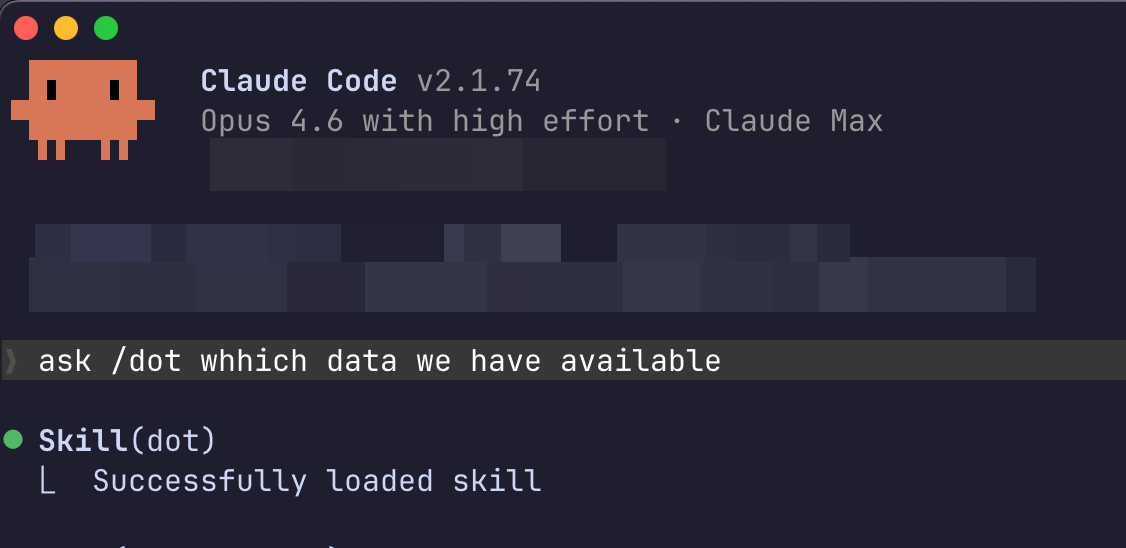
Type /dot in Claude Code to query your company data
Type /dot in Claude Code to query your company data
` with the code it printed. Use `dot login --browser` to force the browser flow.

That's it. Your AI agent can now query your data.

{% hint style="info" %}
You can also copy the install command from the **CLI** tab under **Use Dot elsewhere** on your Profile page in Dot. For a headless machine, open **Headless or CI? Generate a token** on the same tab. It gives you a `dot login --token` command to run there.
{% endhint %}

**Self-hosted Dot:**

```bash
curl https://your-dot-instance.com/install | sh
```

**CI / headless servers:**

Set `DOT_API_TOKEN` through your CI secret store and choose the regional server. The CLI reads these directly without an interactive login:

```bash
export DOT_API_BASE_URL="https://app.getdot.ai"
export DOT_API_TOKEN="YOUR_API_TOKEN"
dot status
```

### How it works

The installer puts a native `dot` binary on your PATH and drops a `SKILL.md` file into the right location for each AI agent. That skill file teaches your coding assistant when and how to call Dot. It's the bridge between a natural language question and your data.

When an agent invokes the skill, it runs `dot` as a sub-agent. Dot queries your database and returns a structured answer: text explanation, data preview, chart, CSV, and a link to the full analysis in the browser. The agent reads all of this and uses it in context.

No runtime dependencies. No configuration beyond `dot login`.

### Using with AI agents

#### Claude Code

Type **`/dot`** followed by your question:

```
/dot What data sources do we have?
```

Or just ask naturally. Claude Code will delegate to Dot when it recognizes a data question:

* "What were our top 10 customers by revenue last quarter?"
* "Is the orders table growing?"
* "Show me monthly active users for the past year"

Claude Code uses Dot like any other tool in its toolkit. It decides when to call it, reads the results, and incorporates them into its response.

#### Cursor, Codex, and Gemini CLI

Same behavior. The installer configures each agent it detects. The skill file tells the agent what Dot can do and when to use it. No manual setup.

### Standalone usage

You can also use Dot directly from any terminal:

```bash
dot "What were total sales last month?"
```

Returns a text explanation, data preview, chart (PNG), CSV data, a link to the full analysis in Dot, and suggested follow-ups.

#### Follow-up questions

Every response includes a chat ID. Continue the conversation:

```bash
dot "Now break down by region" --chat cli-m1abc2d-x4y5z6
```

#### View available data

```bash
dot catalog
```

Instant response. Shows your connections, tables, column counts and row counts.

#### Other commands

```bash
dot update          # Update to latest version now
dot status          # Login status and a live check of your token (--json for scripts)
dot logout          # Clear credentials
dot --version       # Show version
dot --help          # Show all options
```

#### Updates

The CLI keeps itself current. When a newer version is available it installs in the background and takes effect on your next command, so nothing waits on the download. It tries at most once an hour. Run `dot update` to update right away.

### Workspace management

The CLI is designed as the AI interface to Dot. When you use Claude Code, Cursor, or Codex, your AI assistant manages your Dot workspace through these commands — selecting relevant tables, creating notes with metric definitions, and fixing context gaps. You don't need to type these commands yourself; your AI agent handles it.

{% hint style="info" %}
**How AI agents use this:** When you say "help me set up Dot for our revenue data", your AI assistant will run `dot catalog` to see what's available, `dot tables list` to check active tables, `dot notes list` to audit existing context, and then interview you to fill gaps — creating notes from your answers.
{% endhint %}

#### Notes

Notes teach Dot how to query your data. They contain metric definitions, SQL patterns, business context, and operating principles. See [Notes](/train-dot/model/notes.md) for what to put in them.

```bash
dot notes list                          # List all notes (tree view)
dot notes get                       # Read a note
dot notes create  [content]      # Create a note
dot notes update <id> [content]         # Update a note
dot notes delete <id>                   # Delete a note
dot notes activate <id>                 # Activate a note
dot notes deactivate <id>              # Deactivate a note
```

Create notes from files or stdin for longer content:

```bash
dot notes create "Metric Glossary" --file metrics.md
cat playbook.md | dot notes create "Campaign Review Playbook"
```

Organize notes with groups and parent relationships:

```bash
dot notes create "SQL Patterns" --parent <parent-id> --group data-team
```

Inactive notes are not used by Dot when answering questions. Deactivate instead of deleting to archive notes you might need later.

#### Tables

Control which database tables Dot can access. Deactivated tables are hidden from Dot entirely.

```bash
dot tables list                         # Active tables, grouped by connection
dot tables list --all                   # Include inactive tables
dot tables get <id>                     # Table details with columns
dot tables activate <id> [id2 ...]      # Activate table(s)
dot tables deactivate <id> [id2 ...]    # Deactivate table(s)
```

Batch operations work with multiple IDs:

```bash
dot tables activate table-1 table-2 table-3
```

#### Chat history

Retrieve the full conversation history for any previous query:

```bash
dot chat <chat-id>
```

Shows all messages with SQL queries, tool calls, and timestamps. Useful for auditing what Dot did or retrieving answers you saw earlier.

#### Feature requests

Submit feedback or feature requests directly from the terminal:

```bash
dot wish "I want better date filtering"
```

### Evaluations

Run saved business questions as a local or CI check:

```bash
export DOT_ENV="" # Saved evaluation is in Production.
dot eval export YOUR_EVALUATION_ID --output suite.json
dot eval validate suite.json
dot eval run suite.json --target production --dry-run
dot eval run suite.json --target production \
  --output results.json --junit results.xml
```

Use an environment ID for `DOT_ENV` to read a draft evaluation, and `--target` to choose the context to test. Preview spends no evaluation credits; actual runs wait for results and exit nonzero if the gate fails.

See [Evaluations in CI](/developers/api/evaluations-in-ci.md) to create a suite or add a GitHub Actions workflow.

### Apps as code

Dashboards ("apps") are code too. Author `.app` files locally, push them to Dot to build and activate, and manage them through your GitHub repo like any other source. Pushed apps land in the `apps/` folder that [GitHub Sync](/train-dot/version-control/github.md) mirrors to your repo.

The loop:

1. **Author** or edit an `.app` file locally.
2. **`dot apps push <id>`** — Dot builds and activates the app, then writes an `.app.lock` (the compiled SQL) next to it.
3. **Sync** — your `apps/` folder pushes to your connected GitHub repo.
4. **`dot apps pr`** — commit the app files and open a pull request.

Common flow:

```bash
dot apps pull <id>       # Fetch the .app source + .app.lock
dot apps push <id>       # Build + activate; writes the .app.lock
dot apps status <id>     # Lock freshness (non-zero exit when stale)
dot apps preview <id>    # Print the preview URL
dot apps pr              # Commit app files, push, open a PR
```

`dot apps deploy` is an alias for `dot apps pr`.

Advanced:

```bash
dot apps validate <id>                 # Validate locks against the model
dot apps bless <id>                    # Accept hand-edited compiled SQL
dot apps resolve <id>                  # Recompile stale queries
dot apps refactor <id> --rename old:new  # Rewrite locked SQL (sqlglot)
dot apps deps <table[.column]>         # Show apps that depend on a table/column
dot apps plan                          # Derive dbt schema mapping and renames
```

{% hint style="info" %}
`dot apps status` exits non-zero when a lock is stale, so you can gate CI on it. Add `--json` for machine-readable output.
{% endhint %}

### Environments

Environments let you branch and test model changes safely before they reach Production — each one is a git branch of your model that you can edit, diff, and merge back.

```bash
dot env list             # Production + all environments
dot env current          # The active environment
dot env show <name>      # Environment details
dot env create <name>    # New environment (--from <id|name> to branch off another)
dot env use <name>       # Set the active environment (scopes later commands)
dot env diff <name>      # Changed files vs Production
dot env merge <name> --confirm   # Merge changes back into Production
```

`dot env use` saves your choice locally; every later command runs against that environment until you `dot env unset`. Further verbs — `rename`, `delete`, `unset`, `conflicts` (predict merge conflicts), and `target` / `sync-target` (per-connection dbt-style overrides) — are covered by:

```bash
dot env --help
```

### Training Dot effectively

The biggest leverage in Dot accuracy comes from good context management. Here's the recommended approach:

**Start with tables.** Select the right data sources and document what each table represents — especially granularity (what does one row mean?) and primary keys. For wide tables or semantic models with hundreds of fields, curate which columns are active.

**Layer in notes.** After tables are set up, add notes for metric definitions, operating principles, and business context. Use strong, unambiguous language: "Always filter out internal users", "Revenue means recognized revenue, not bookings."

**Fix bad answers at the root.** When Dot gives a wrong answer, don't just correct it — investigate why. Wrong table? Activate the right one. Wrong logic? Add a metric definition. Missing context? Add a business context note.

**Audit regularly.** Review existing notes for contradictions. If one note says "use fct\_orders for revenue" and another says "use fct\_arr for revenue" — that ambiguity will produce inconsistent answers. Remove or reconcile.

**Front-load, then prune.** It's better to give too much context upfront and dial it back than to discover gaps one bad answer at a time.

### Caching

Responses are cached on disk. Repeated questions return instantly.

```bash
dot "question" --no-cache    # Skip cache, force fresh
dot --clear-cache            # Clear all cached responses
```

Follow-ups (`--chat`) and `dot catalog` are never cached. Cache lives at `~/.cache/dot/`, scoped per user.

### Security

* Tokens stored locally with `600` permissions
* One token per user. Generating a new one revokes the old one
* Tokens expire after 365 days
* All Dot permissions and row-level security enforced
* All queries logged for compliance

### Troubleshooting

**"Not authenticated"** Run `dot login` or check with `dot status`.

**"Connection failed"** Check your network. For custom servers: `dot login --server https://your-server.com`.

**Slow responses** First query takes 10-30 seconds (full analysis pipeline). Identical queries return instantly from cache after that.